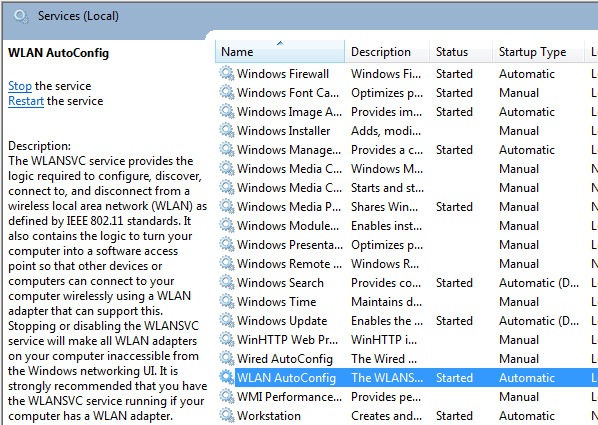




WLANAutoConfig

How to Fix Disabled Wireless Device in Windows 7

I had this problem in Windows 7 where wireless device always show disabled. I opened Control Panel\Network and Internet\Network Connections and then right click on disabled Wireless Network Connection, and choose Enable. After that status window appeared show ‘Enabling..’ message, but the device was still disabled. To fix this problem, I opened Control Panel\Administrative Tools\Services,…

Read More

Install Subversion on Debian

First of all, install these packages: apache2, php5, subversion. # apt-get install apache2 # apt-get install libapache2-mod-php5 # apt-get install subversion # apt-get install libapache2-svn Create repository folder. # mkdir /subversion # svnadmin create –fs-type fsfs /subversion/kendal Make sure subversion is activated in apache. # a2enmod dav # a2enmod dav_svn Create user account for subversion….

Read More

How to Install OpenVPN in Ubuntu 11.04

Few days ago I bought VPS account which I installed Ubuntu 11.04. This is how I installed OpenVPN into the VPS. The network configuration: # ifconfig lo        Link encap:Local Loopback inet addr:127.0.0.1  Mask:255.0.0.0 UP LOOPBACK RUNNING  MTU:16436  Metric:1 RX packets:11947 errors:0 dropped:0 overruns:0 frame:0 TX packets:11947 errors:0 dropped:0 overruns:0 carrier:0 collisions:0 txqueuelen:0 RX bytes:1287068 (1.2…

Read More

Connect to Wireless Network (WEP) in Ubuntu 11.04 using Command Line

Check wireless adapter: $ iwconfig You will see wireless adapter as wlan0 or ath0 which depends on what driver is installed. Execute the following command to apply ESSID, network key, channel, and mode: $ sudo iwconfig wlan0 essid yantoknuk-singtel $ sudo iwconfig wlan0 channel 6 $ sudo iwconfig wlan0 key ngumbahkucing $ sudo iwconfig wlan0…

Read More